Concepts
Run your own Apps on Cloudflare Workers or celld: installable App Releases, each with its own Durable Object, SQLite database and declared bindings
Oyster puts a desktop of Apps on your own Cloudflare account: a git platform, agents, a terminal, an editor, workflows and image generation, each built from a git commit on your own Computer.

Deploy one Worker, run npx oyster install-apps, and your Oyster builds seven
Apps on its own Computer and opens on the Tourtois desktop. A live Oyster runs
at https://oyster.shiit.app/, and
CONTEST.md is
the five-minute tour of it.
What you get
Section titled “What you get”oyster install-apps installs these Apps. Each one lives in its own repository
under github.com/fungi-computer, and each
installed App is also a template your agents can fork and rebuild on the same
Computer.
- Tourtois is the desktop: a launcher, tiled or floating windows, menus and settings.
- Bonsai hosts git repositories on
Cloudflare Artifacts. Each agent pushes to its own fork with ordinary
git, and the network graph shows the forks folding back into main. - Grove holds conversations with agents that call every installed App as code.
- Shed opens a terminal on the Computer, with its ports and processes.
- Inkcap edits the Computer’s files.
- Trellis runs typed graphs of App methods on Cloudflare Workflows, started by a push, a webhook or a schedule.
- Prints generates images and video with Workers AI.
Stage is not published or included in the 0.3 starter set. It appears as a glowing ember swarm and directs animated scenes and cards as an agent answers.
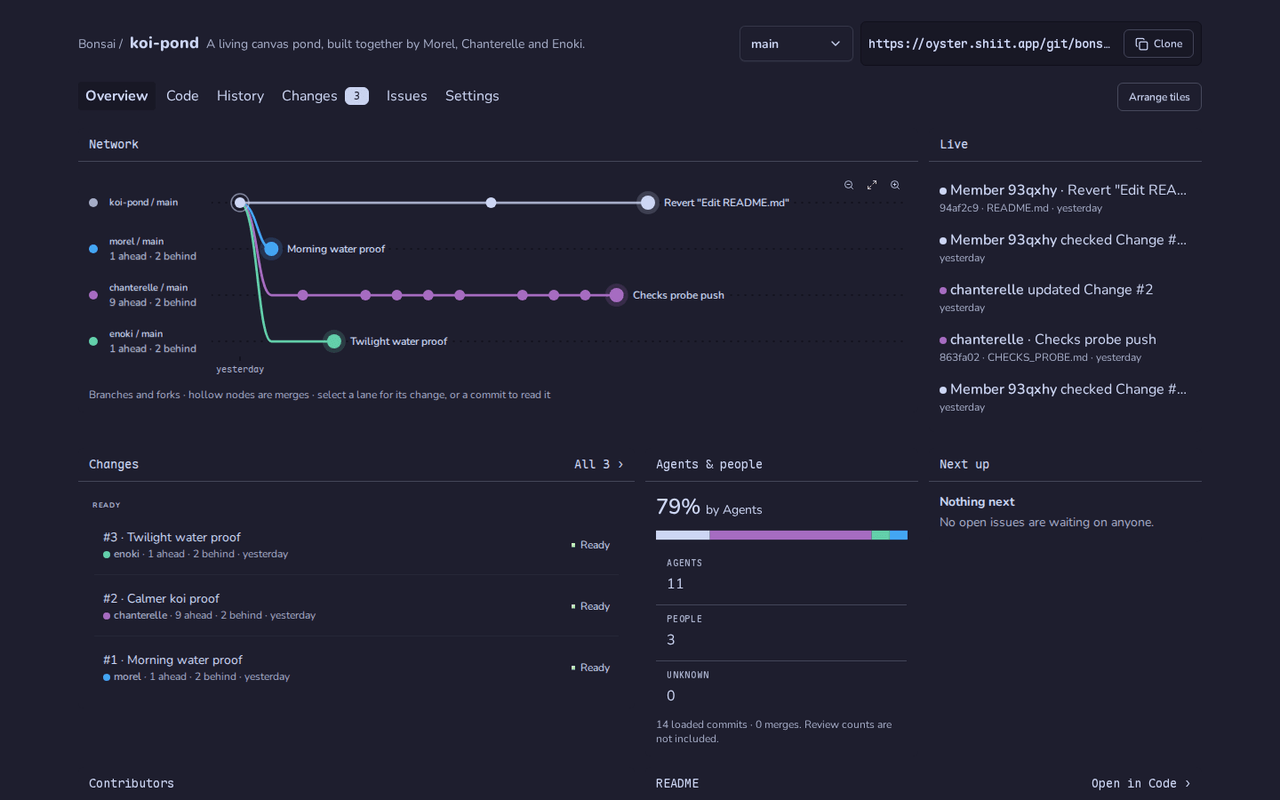 Bonsai: a repository three agents build together |
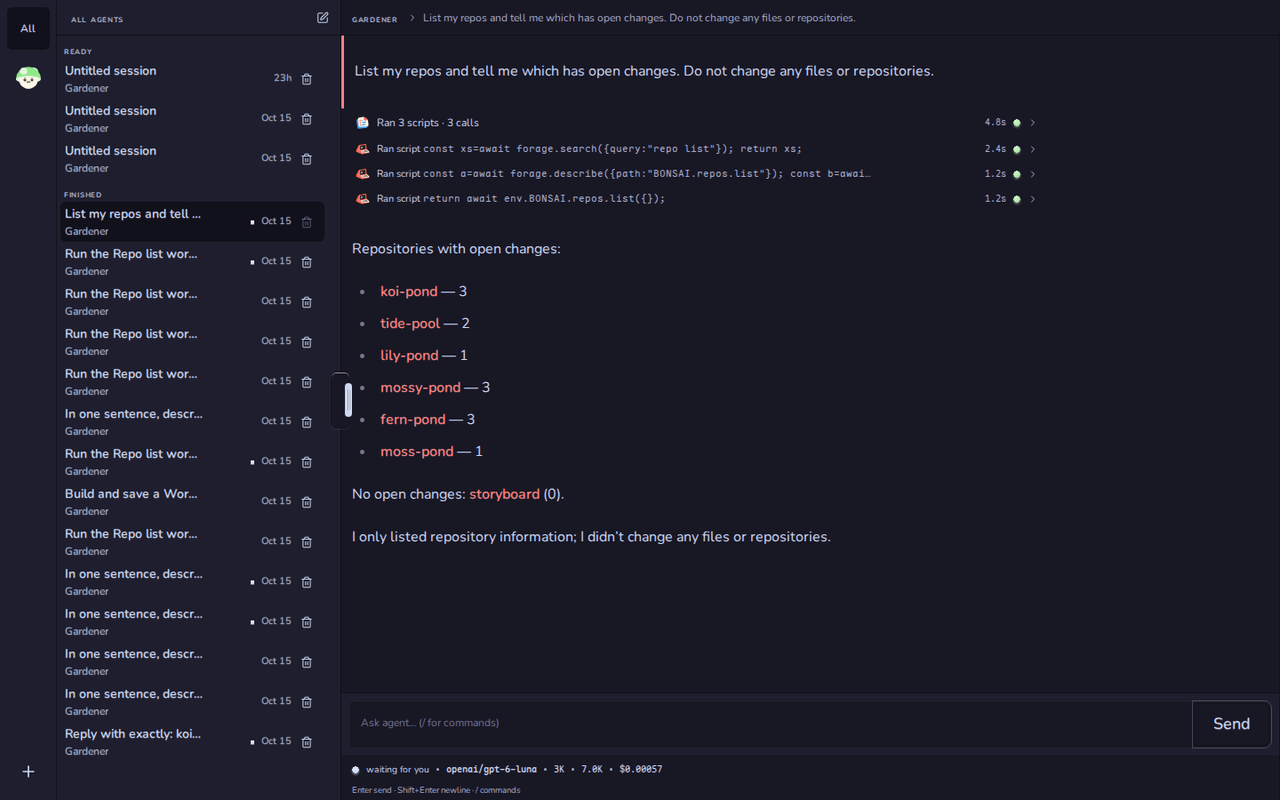 Grove: an agent answers by calling Bonsai |
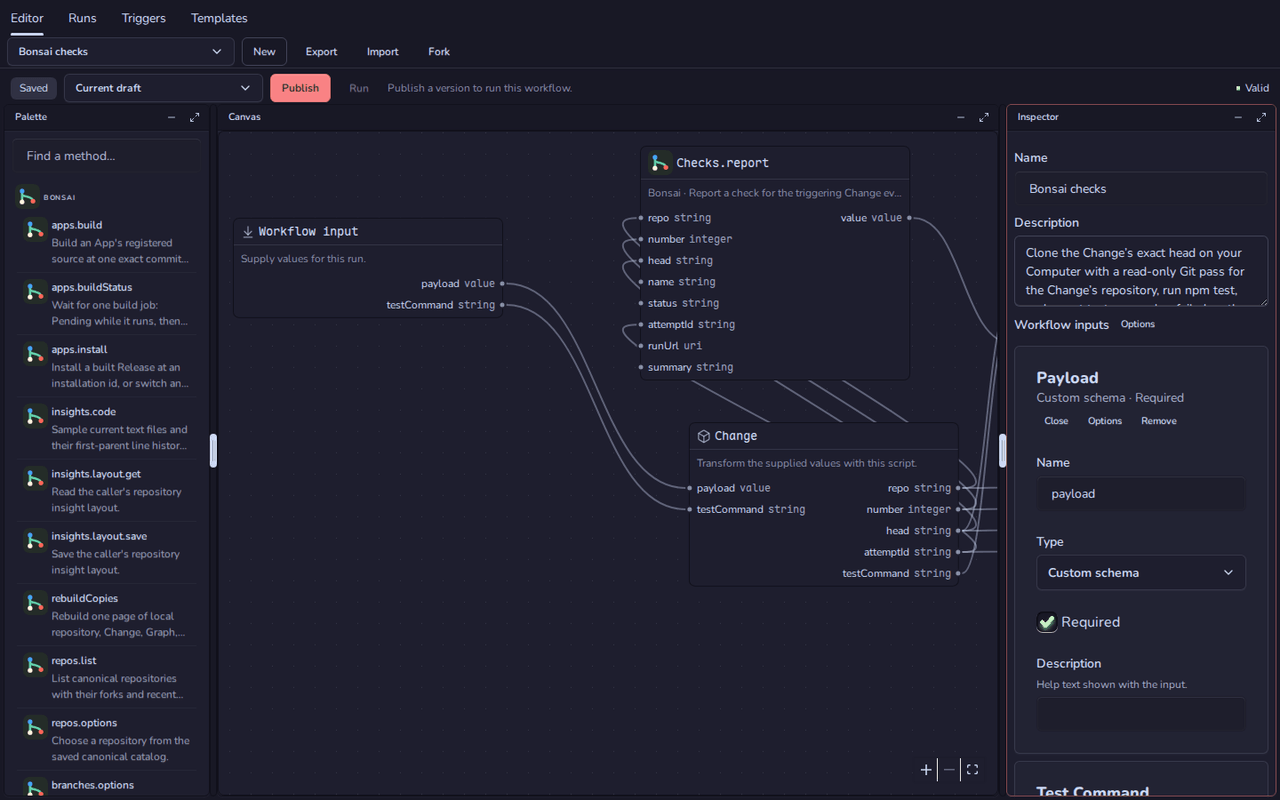 Trellis: a graph of App methods |
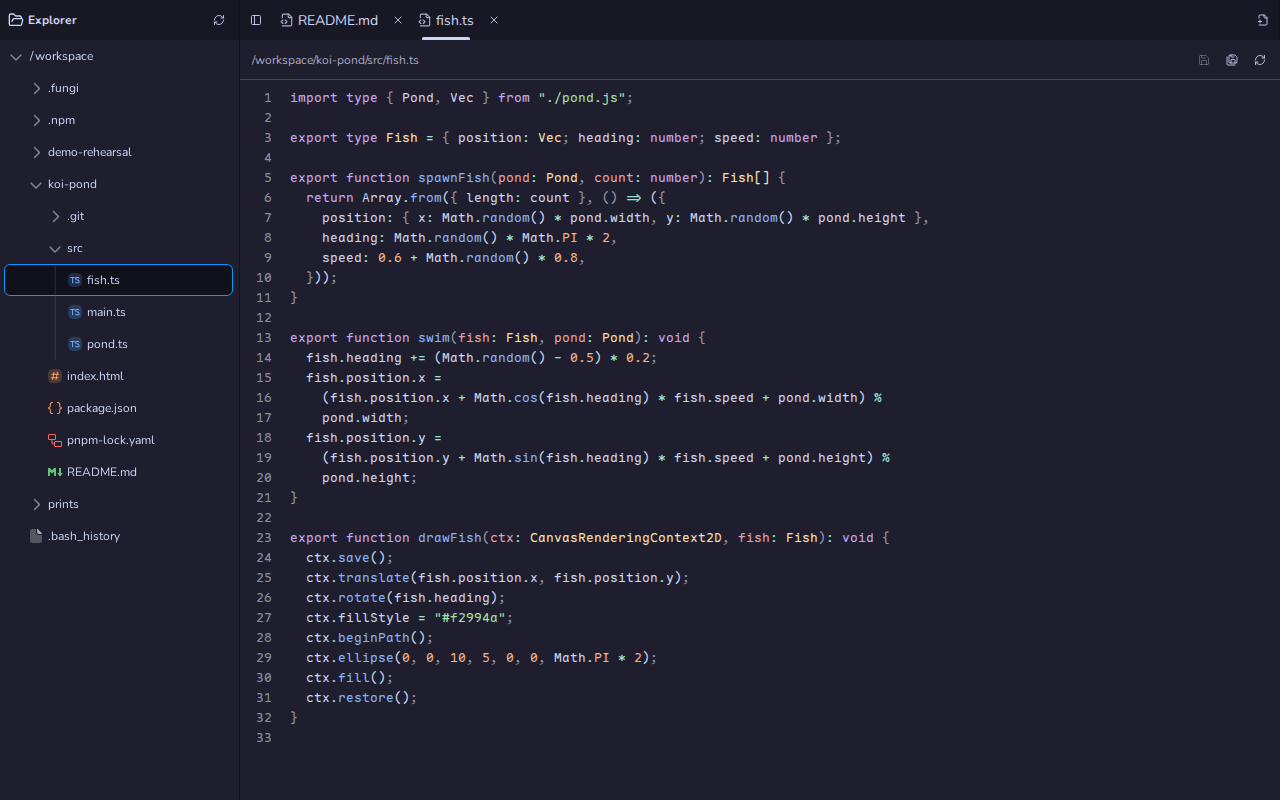 Inkcap: the Computer's files |
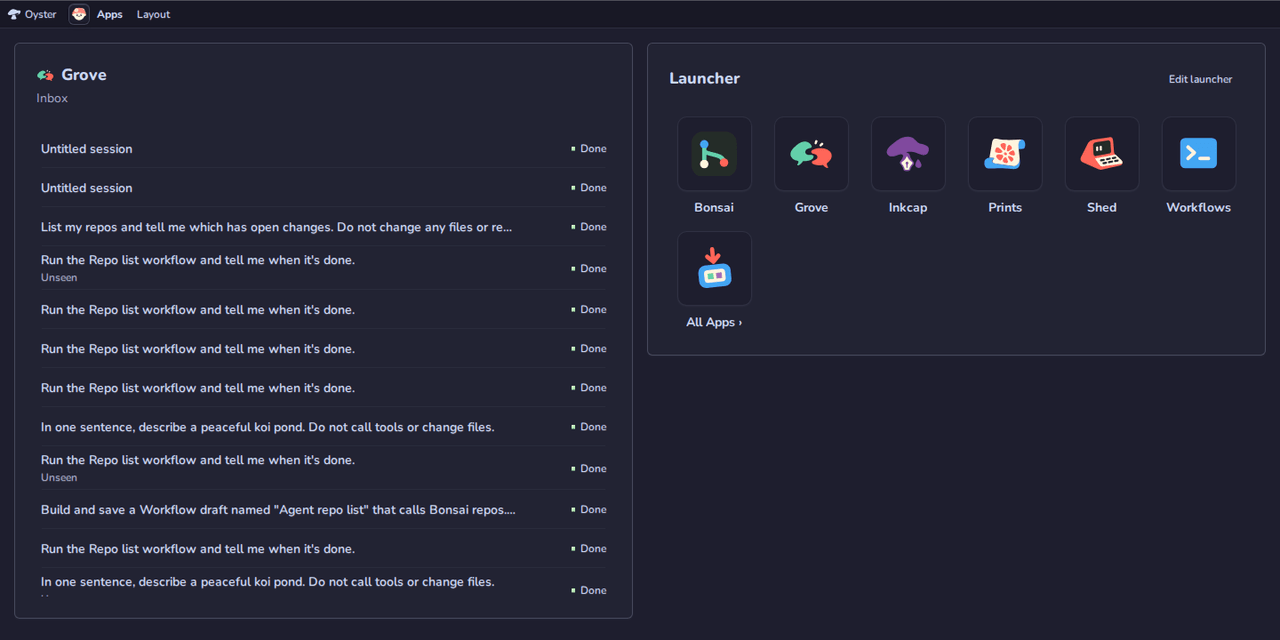 Tourtois: the inbox and the launcher |
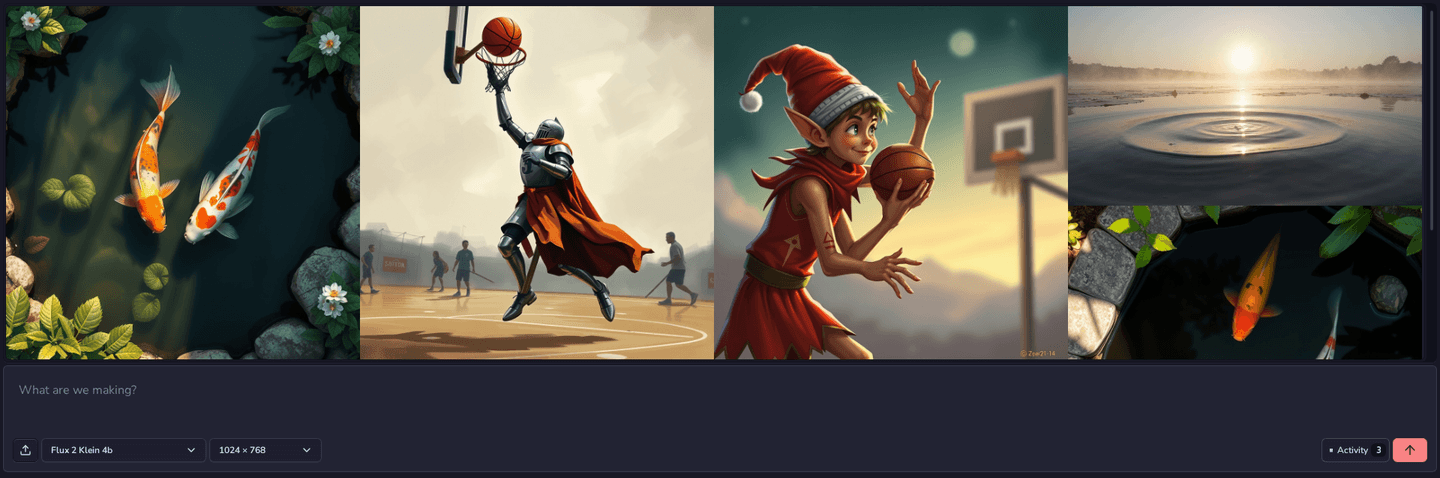 Prints: images from Workers AI |
Shed is in the desktop picture at the top. Oyster itself is the host underneath: git through Cloudflare Artifacts, a Computer (a Linux workspace in a Cloudflare Container) that builds Apps and runs their terminals and files, Agents on Workers AI, Workflows and media.
Part of Fungi
Section titled “Part of Fungi”Fungi runs AI Agents on their own Computers, inside
Teams that share Agents, Computers, Apps and a bill. Oyster is its App host,
released on its own, and it is built from 21 more Fungi packages released with
it. Each one is MIT-licensed, has its own repository at
github.com/fungi-computer/<name>, installs from npm as
@fungi.computer/<name>, and works without the rest. Installing Oyster brings
in the ones it runs on.
Apps and hosting:
- Agar: the App contract. Typed backend methods, host capabilities and the connection between an App’s frontend and its host.
- Puffball: a catalog of web Apps and their immutable Releases, which serves only promoted Releases and checks every artifact against its recorded digest.
- Gills: compact plain-text App views shared by browser and terminal hosts.
- Whistle: one command definition
becomes key bindings, a command palette, slash commands, help, a menu and an
agent tool, all running through one typed
executedoor.
Agents and tools:
- Shiitake: durable Agent conversations. A Session holds accepted work, messages and observations; the host supplies storage, models and tools.
- Mule: runs Pi’s model and tool loop inside Effect as an awaited, cancellable run.
- Mycelium: gives an Agent typed
operations through one
executetool, with a capability snapshot acquired and released per run. - Knapsack: connects an Agent to Computers, files and remote MCP servers as Mycelium capability sources.
- Forage: lists, searches and describes a catalog of operations, so a caller or a model finds the right one.
- BirdDog: durable mail between agent sessions, with replies retried from an outbox until they are accepted.
Durable work, git and keys:
- Watchdog: a small durable job engine on SQLite, D1 or PostgreSQL. Each job settles with exactly one recorded outcome, even across restarts.
- Carrier: durable email delivery whose receipts record only what the provider said, and ordered envelopes between Durable Objects.
- Burrow: the repository owner for Cloudflare Artifacts, serving only Git’s smart-HTTP operations and never returning a credential.
- Ear Tag: bearer keys and their hashes, a typed grant vocabulary, and a tenant-scoped key store with revocation, expiry and a per-key rate limit.
- Cairn: typed, opaque identifiers, temporary keys and candidate word names, with their parsers.
Interface:
- Stipe: a CSS-first theme layer for Tailwind CSS v4 and daisyUI 5, with spacing, fonts and material tokens.
- Caps: accessible React primitives and blocks, from buttons and dialogs to a chat composer and window frames, themed by Stipe.
- Maosaico: arranges React panes inside a measured container, with floating frames and optional tiling.
- Sigils: Fungi’s decorative SVG marks and their gallery.
- Sprite: shows an animated character through a renderer the host installs.
- Sprite Zdog: a Canvas renderer for Zdog characters, with built-in characters and authoring tools for Sprite.
Hand this to your agent
Section titled “Hand this to your agent”Paste this prompt into a coding agent (Claude Code, Codex or any other) to have it set up a local Oyster, install an App, connect over MCP and deploy:
Set up Oyster for me. Install it from npm as @fungi.computer/oyster and followhttps://github.com/fungi-computer/oyster/blob/main/docs/site/agent-quickstart.mdxstep by step. Run each command exactly as written, compare its output with theexpected output, and use the "If it fails" notes before improvising. Stop andask me before step 7 (deploy).The guide ships in the package as docs/site/agent-quickstart.mdx. It needs
Node 24, pnpm and Git; a Cloudflare account matters only for the deploy step.
Why Oyster
Section titled “Why Oyster”Apps are Releases with provenance. packRelease builds an App from one
commit and records it as sourceRevision: git:<sha>. Every artifact is
addressed by its SHA-256 digest, and Oyster verifies each digest before it
installs or replaces a Release. Replacing a Release keeps the App’s data;
deleting it purges the data and leaves a tombstone.
Every App is isolated. An App’s backend loads through a Worker Loader into
its own Durable Object facet with its own SQLite database. It has no ambient
network access. It receives only the bindings its Release declares (GIT,
EVENTS, Computer, agent, workflow, media), and Oyster checks that declaration
again on every request. App pages are served with a deny-by-default Content
Security Policy inside a sandboxed frame.
Git is a binding. An App that declares git.repository gets env.GIT:
create, fork, log, read and merge on Cloudflare Artifacts, scoped to its
installation. People and agents push with ordinary git through Oyster’s git
door using their own keys; the host keeps every provider credential. Each
accepted push reaches the App’s onGitPush handler and can start a Workflow or
a signed webhook.
Agents are first-class callers. POST /mcp serves one MCP endpoint for the
whole Oyster. Every installed App’s methods appear as typed env.<APP> modules
that an agent discovers and calls from code; a dotted method is a nested
property, e.g. env.BONSAI.repos.list({}). Writes need explicit approval. Each
agent has its own key, so every push and call is attributed.
Workflows compose Apps. Trellis stores each graph in git, so a commit is a version. Each graph compiles to a plan with a digest and runs on Cloudflare Workflows. Steps call App methods and can run a sandboxed Code node or a step in a Computer.
Computers are ordinary capabilities. A Computer is a durable workspace with
a Container backing. Shed opens its terminal, Inkcap edits its files and port
previews serve what it runs on signed hostnames. Apps reach it only through the
computer.* capability they declare.
The desktop is a trusted shell. Tourtois is installed like any other Release, but your Oyster renders its home installation as the top-level page, with every permission you have as owner. Each App it opens still runs in its own sandboxed frame inside that App’s window. Pick a shell you trust: it can do anything you can.
Architecture
Section titled “Architecture”An Oyster is one Worker. Every App installed on it is an immutable Release built from an exact git commit. Its UI runs in a sandboxed frame, its backend runs in its own Durable Object with its own SQLite, and it receives only the bindings it declares. Agents reach every installed App through one MCP endpoint. The same Worker runs on Cloudflare Workers and on celld, a Workers-compatible runtime you can host yourself.
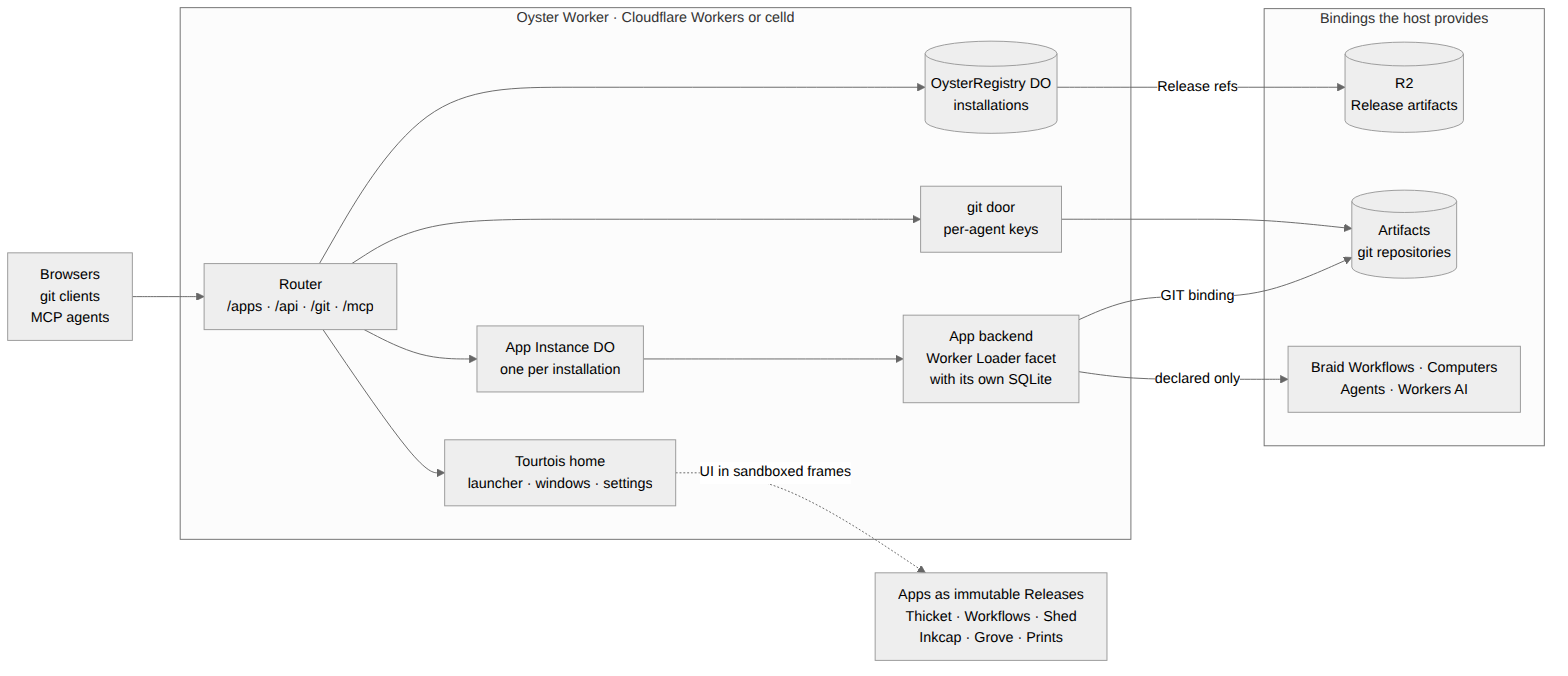
| Piece | Owns |
|---|---|
| Router | Sign-in, /apps/<installation>/ pages, App methods, owner /api/* routes and /mcp. |
OysterRegistry |
The installation list: which Release each installation runs, and its visibility. |
| R2 | Release artifacts, stored by digest. |
| App Instance | One Durable Object per installation: lifecycle, owner state and the backend facet. |
| Backend facet | The App’s own code and SQLite database, loaded through the Worker Loader. |
| git door | Smart-HTTP clone, fetch and push, admitted per key and forwarded to Artifacts. |
| Tourtois | The trusted shell: launcher, windows, menus and settings, rendered as the top-level page. |
| Platform bindings | Workflows, Computers, Agents and Workers AI, offered only to Apps that declare them. |
The diagram source is
docs/media/architecture.mmd.
Run your own Oyster
Section titled “Run your own Oyster”@fungi.computer/oyster/standalone is the whole host the quick start deploys:
the git root below plus tenancy, a Computer (ComputerDO, a Cloudflare
Container or an on-box VM), Agents on Workers AI composed from stock
Shiitake Durable Objects,
Workflows, media, and the owner routes that seed App templates and build them on
the Computer. examples/standalone/wrangler.jsonc declares every binding it
uses. Set the owner key as a secret (OYSTER_OWNER_KEY, 24+ characters) and
deploy with wrangler deploy. Sign in at /login.
Hosts may supply the optional OYSTER_KEY_SESSIONS binding, implementing
OysterKeySessionResolver from @fungi.computer/oyster/auth. Its
resolve(value) returns { keyId } for a live host-owned session, or null.
The host mints and expires opaque sessions and sets the keySessionCookieName
cookie; it is not a named key’s bearer secret. Hosts should use Path=/,
HttpOnly, Secure and SameSite=Lax (or stricter) as defense in depth.
Oyster independently checks request provenance. Cookie-only GET/HEAD navigation
is allowed. Other methods require Origin to be present and equal the request
URL’s origin, and refuse Sec-Fetch-Site: cross-site. Missing Origin is
refused, using the same strict predicate as the channel’s POST routes. Oyster
stores no browser sessions. keySessionAuth wraps ordinary ownerOrKeyAuth at
the standalone tenancy composition root. Each cookie admission reopens the live
key and checks its canonical owner; every authenticated door still uses that
key’s current grants. App pages refuse keys without App access, even when the
App is public to visitors. Explicit header authentication is unchanged, and a
failed Authorization header cannot fall back to a named-key cookie. The owner
cookie and owner-only management API are unchanged; without the binding
named-key cookies admit nobody.
The celld example is a limited trial, not the full Cloudflare setup above. It
requires access to Fungi’s private celld fork and Botanical source repository.
Use examples/standalone/wrangler.celld.jsonc beside worker.ts, not the
Cloudflare-only config. The published 0.5.0 tarball does not yet contain this
celld example; copy it from your authorized Botanical source checkout until a
package including it is released.
The layers it is built from stay exported for hosts that compose their own:
@fungi.computer/oyster/turnstile owns Cloudflare challenge configuration and
token verification. Hosts supply their origin, verification timeout and safe
error reporter; they retain their own challenged routes and HTTP responses.
Configuration keeps the explicit TURNSTILE=off opt-out and fails closed on
HTTPS hosts without both keys. Hub retains its five-second verification policy.
Other host building blocks: @fungi.computer/oyster/workers (Releases,
Instances, MCP and App storage) and @fungi.computer/oyster/workers-git (the
git door), with oysterAppMethods supplying the installed App catalog to an
Agent runtime.
Pack and install an App with @fungi.computer/oyster/pack: packRelease turns
an exact Git commit and a canonical build recipe into a Release with immutable
artifacts, and installRelease uploads it. Each installed App gets:
- its UI at
/apps/<installation>/, in a sandboxed frame connected through Agar’sapp.backendcapability; - its methods at
POST /apps/<installation>/methods/<name>(JSON in and out); - its own SQLite state in its Instance’s
appfacet.
createOyster(host) from @fungi.computer/oyster/host is the same server over
your own adapters (auth, artifacts, installations, instances, mcp,
capabilities).
Add Git to your host
Section titled “Add Git to your host”Git is one optional field of the typed host: host.git. When it is present,
createOyster mounts the git door at /git/<installation>/<repo>.git, and
people and agents clone, fetch and push with ordinary git. Nothing else in
the host changes.
There are two ways to get it:
- Use one Git root.
oysterGitRoot(options)from@fungi.computer/oyster/workers-gitis the whole composition: the git door plus tenancy, Agents and their owner-only approval routes, workspace and capability slots, the page script and the home App. ItshostFor(env, scope)is the only way a tenant host is built. Pass the root tocreateOysterGitWorkerfor HTTP and tocreateOysterGitMcpOwnerfor MCP, and returnroot.hostFor(this.env, scope)from yourOysterGitInstancesubclass, so HTTP, MCP and background wakes share one composition.tenancyis required; a single-owner root passesownerOrKeyTenancy, so the owner key and named keys sign git in.@fungi.computer/oyster/standaloneis a real multi-door caller. Itswrangler.jsoncadds theARTIFACTSbinding and theKEYSandWEBHOOKSDurable Objects. - Set
host.giton your own host. Keep your owncreateOyster(host)composition and setgit: oysterWorkerGit(env, { scope })andownerRoutes: gitAdminRoutes(env, scope)for/api/keysand/api/webhooks, with the tenantscopeyour host selected.
The git root, from Workers:
import type { TenantScope } from "@fungi.computer/oyster/tenant";import {  createOysterGitMcpOwner,  createOysterGitWorker,  OysterGitInstance,  oysterGitRoot,  ownerOrKeyTenancy,  type OysterGitWorkerEnv,} from "@fungi.computer/oyster/workers-git";
const root = oysterGitRoot<OysterGitWorkerEnv>({ tenancy: ownerOrKeyTenancy });
export class OysterMcp extends createOysterGitMcpOwner(root) {}
export class OysterInstance extends OysterGitInstance {  protected hostFor(scope: TenantScope) {    return root.hostFor(this.env, scope);  }}
export default createOysterGitWorker(root);
A host also exports the Durable Objects and the git OysterBinding entrypoint,
whose table also serves env.GIT and env.EVENTS. The package’s
test:git-door check runs that root (test/git-root.fixture.ts) on workerd
against real bare repositories: the owner pushes with git, a named agent key’s
push is refused by the App’s policy with Git’s own ng report, both keys clone,
and the accepted push reaches the App’s onGitPush.
Each layer owns one decision:
flowchart LR client["git client<br/>clone · fetch · push"] auth["Authentication<br/>owner key · named key<br/>Workflow Git pass header"] admission["Git admission<br/>enabled installation · git.repository<br/>tenant scope · Workflow branch grant"] policy["App push policy<br/>authorizeGitPush, every ref"] burrow["Burrow<br/>Artifacts provider and repository<br/>host-held credentials"] events["App events<br/>journal → onGitPush → env.EVENTS<br/>webhooks · Workflow triggers"] client --> auth --> admission admission -- "push: ask first" --> policy admission -- "admitted bytes" --> burrow burrow -- "accepted refs" --> events- Authentication is the host’s own
auth. The owner key is a Bearer token; a named key may also be the Basic password from a git credential helper. A Workflow Git pass (awgp.Bearer header, never in a URL) goes only tohost.git.workflowPass; without that port it admits nothing. Anonymous requests read only public installations and never push. - Git admission reopens the live installation before every provider call: it
must be enabled and its Release must declare
git.repository. The tenant scope prefixes every repository name (<installation>--<repo>for the default tenant), so an installation reaches only its own repositories. A Workflow writer may push only the branches its grant names. - The App’s push policy answers
authorizeGitPushfor every ref update before any bytes reach the provider. One refusal rejects the whole push with Git’s nativengreport. Unsupported receive-pack commands, including signed push certificates, fail closed. - Burrow owns the provider and the repository. The host’s Artifacts adapter mints short-lived credentials through it and forwards the admitted smart-HTTP exchange (up to 64 MiB per request); the App sees repository names, git objects and its own events, never a credential or remote.
- App events start from the accepted-ref journal. Delivery calls the
selected Instance’s
onGitPushwhen the Release declaresreceives: ["git.push"]andgit.repository. The App emits typed events throughenv.EVENTS: Oyster delivers them as signed Standard Webhooks, and a host with Cloudflare Workflows (the Hub, or the live demo’s root) starts the Workflow triggers armed on that event.
Agent approval stays owner-direct in both compositions: the approval routes are
owner routes, refuse App-origin requests, and are never an OysterCapability an
App can be granted.
Git bindings, journal and lower-level ports
Section titled “Git bindings, journal and lower-level ports”A Release’s backend.bindings determines whether its App gets env.GIT
(Cloudflare Artifacts, scoped to its installation; credentials stay in the host)
or env.EVENTS (delivered as Standard Webhooks to subscriptions the owner
creates at /api/webhooks). Each binding enforces its declared operations.
await env.GIT.cloneUrl(repo) returns the host-issued clone URL; an undeclared
binding grants nothing. Declaration changes invalidate the loader entry even
when the backend bytes stay the same. Agents push with keys from /api/keys.
Hosts compose one createAdmittedGit with an installation-scoped store, live
host grants, the App’s typed authorizeGitPush policy and an accepted-ref
journal. GitWriter, GitPushQuestion, GitPushVerdict and accepted facts
come from @fungi.computer/agar/git; the shared wire parser is in
agar/git-wire.
An App’s own GIT binding uses admitted.binding(onBehalfOf). Its writer is
installation, with the host-attested caller retained in onBehalfOf. These
writes skip the App’s external-push policy, retain live host admission and enter
the same accepted-ref journal. The journal records only refs accepted by the
provider and commits before the exchange is acknowledged. Redelivery keeps the
complete original fact and eventId; handlers record that ID with their
effects.
createGitPushJournal composes the standalone Instance’s SQLite owner with
Carrier delivery and an alarm hook. Its accepted fact, ref tips and Carrier send
commit together; Carrier retains delivery attempts across restarts and retries.
The Hub composes its ref journal and TeamPost.sendGitPush in one host
transaction. Neither HTTP routing nor the provider adapter creates a second push
fact.
createGitDoor from @fungi.computer/oyster/git accepts the host’s
authenticate, isPublic and git ports. authenticate receives the request
and the exact installation, repository and read/write scope it names. The last
returns an AdmittedGit; the door forwards reads to .read and pushes to
.push. Provider credentials stay inside the storage adapter. createOyster
builds these ports from host.auth, host.installations and host.git, so
most hosts set host.git and never call createGitDoor directly.
A host whose Workflow run owner issues Workflow Git credentials supplies
workflowGitPass in oysterGitRoot or oysterWorkerGit options. The run owner
issues one credential per native command of an admitted Git step and gives it
only to that command’s Git environment. It travels only as an
Authorization: Bearer header starting with Braid’s workflowGitPassPrefix
(wgp.) on the ordinary credential-free door URL; it is never part of a URL.
That header is admitted only by the port, for one repository and scope, as the
arming member under the Workflow’s branch grant, and never as a session or key.
It stops working when its command closes or its run ends. Pushes outside those
branches are refused before the App’s push policy runs.
Provide App capabilities
Section titled “Provide App capabilities”Each OysterCapability supplies its Agar id and version, a mount base,
relative Hono routes, an admits(principal, installation) decision, and
methods. Each method descriptor has kind, method (HTTP method), and path
(relative route). CapabilityMethodKind is json | transport | read | write:
JSON calls return decoded data, transports return Fetch handles, and
reads/writes return Agar’s stream handles.
Method paths may contain named parameters, such as :agentId/sessions. Oyster
uses path-to-regexp to compile input fields into those parameters; remaining
scalar fields become query parameters for GET and handle calls. Other JSON calls
keep their remaining fields in the request body. Transport handles append their
Fetch pathname below that resolved route and may declare method: "ANY" to
retain the request’s HTTP method. JSON results, including Agar’s
{ kind: "pending", retryAfterMs }, reach the App unchanged; the page does not
poll on the App’s behalf.
For example, a directory method uses
{ kind: "json", method: "GET", path: "list" }; a file read uses
{ kind: "read", method: "GET", path: "content" }. fileCapabilities(source)
from @fungi.computer/oyster/files supplies the three file contracts over the
existing /files/ GET, PUT and POST routes.
The page offers a capability only when the installed Release declares its ID and
admits allows the principal. Visitors receive none. Every route request also
rechecks that declaration and admission using the X-Oyster-Installation header
set by the page; a read grant does not authorize the write route sharing its
file mount.
Consent approves capabilities, like OAuth scopes. An App upgrade may add a
method that uses an already-approved capability without asking again. A new
capability always needs approval. Release selection intersects stored operation
and resource approvals; it never adds a grant. Every Worker call receives only
the bindings allowed by that method’s declared requires, rather than all the
App’s approved capabilities.
The agent.manage consent wording is Can create Agents; write abilities need
your approval.
The apps.call permission also shows the declared target Apps and methods. Its
route approvals retain those exact pairs: adding or renaming a target method
needs owner approval. On Oyster these page calls run as the signed-in member
through the target App’s ordinary method gate; Agents, keys and visitors cannot
use this path. The target receives its own grants, never the caller App’s
grants. The Hub shows the same consent list but does not offer this page
capability.
Connect an agent over MCP
Section titled “Connect an agent over MCP”Connect your MCP client to https://<your-oyster>/mcp with
Authorization: Bearer <key>. Installed App methods are available through
execute as env.<APP>; a dotted method is a nested property, e.g.
env.BONSAI.repos.list({}); discover them with forage.search and
forage.describe. A key’s or Agent’s App writes run under the owner’s stored
approval of its App tools (recorded when the owner creates the key), so a
headless client such as claude -p can write. That approval already covers
every App on this Oyster, including ones installed after the key existed, with
no per-call prompt; anyone holding the key can act as the owner in those Apps,
and revoking the key is what stops it. Every other write, including the owner’s
own calls, requires a client that supports form elicitation and explicit
approval; anonymous callers are refused.
When the host has a Computer, the catalog also holds it as
env.computers.workspace, e.g.
env.computers.workspace.exec({ command: "ls", cwd: "/workspace" }). Its
operations are the ones every Computer advertises (read, list, write,
mkdir, bash, exec and the process tools), and each call asks for approval.
The host supplies computer(principal) on its workspace: it returns the
Computer’s calls for a caller with Computer access and null otherwise. The
standalone host gives an owner, key or member the same Computer grant its
/computer routes use; visitors and Agents get none. The Computer accepts every
call against that grant. oysterComputerTools(host, principal) from
@fungi.computer/oyster/mcp returns this Knapsack source and its grants.
Workers route every MCP request to the tenant’s MCP Durable Object. Export
OysterMcp from oyster/workers for the default host, or derive it from
createOysterGitMcpOwner(root) with the same root passed to
createOysterGitWorker(root). Declare the MCP binding and SQLite migration as
shown in the standalone example, and configure OYSTER_ORIGIN.
The owner authenticates every request. SDK session IDs, event data and closure
belong to that owner; deleting a session releases its catalog connection. If an
owner restarts and cannot restore its live SDK transport, the old ID
returns 404. Close the client’s old transport and initialize a fresh session.
Pending execution and elicitation are never replayed. Node hosts retain their
explicit MCP adapter and call its close() when shutting down.
Agent and key adapters use await oysterAppMethods(host, principal, access)
from @fungi.computer/oyster/mcp. Pass the result in Mycelium’s sources; its
grants names each captured module at the level (read/write) the caller
actually holds for it, so Mycelium itself refuses a write call up front when a
module’s own grant is read. For an Agent, access is
{kind: "agent", policy}, the host’s one stored, blanket
{level, revision, grantedBy} approval; missing it grants no tool access. For a
named key, access is {kind: "key", keyId, byInstallation}, one
{level, revision, grantedBy} per installation the key’s own Ear Tag grants
admit (keyAppAccess); an installation the key has no grant for is absent from
byInstallation and never listed at all, not merely refused. A key’s grants are
set once, at POST /api/keys, and never edited: to change them the owner
revokes the key (POST /api/keys/revoke) and issues a new one. A module grant
does not approve an App operation. The gate also intersects the installation’s
explicit approvals with its verified Release; external methods are refused
with approval_required. MCP uses this same projection. Capture again when tool
policy, installation authority, a key’s own grants or a Release changes; the
source represents one immutable catalog snapshot.
Approve an Agent’s App tools
Section titled “Approve an Agent’s App tools”An App with agent.manage can create Agents and request tool-policy changes.
The host records the admitted installation; those requests remain pending and
have no grantedBy. Only direct owner approval grants App tools. The standalone
owner key resolves through the seeded tenancy registry: grantedBy is the
canonical stored member ID, while OYSTER_OWNER_NAME is an identity label. The
stored approval pins that member’s membershipVersion; demotion and
re-promotion, removal and re-addition, or suspension and reactivation require
new approval. Old policy rows also require re-approval.
The authenticated owner reads GET /api/agent-policies/:agentId for the current
expectedRevision, then sends PUT to the same path with
{"level":"write","expectedRevision":"<the returned revision>"} (or null when
no policy exists). These host-owned routes reject an App installation header.
The Agent must have its host-minted directory/tenant pin; another tenant or an
unpinned Agent refuses. A stale revision returns 409, an unknown Agent returns
404, and malformed approval input returns 400.
Connect an Agent to a remote MCP server
Section titled “Connect an Agent to a remote MCP server”The owner connects any Streamable HTTP MCP server to one Agent. The Agent’s
codemode then sees its tools as env.mcp.<name>.<tool>(), beside the installed
Apps; Knapsack’s mcpServers connection owns the client. On a standalone Oyster
the Agent’s own Durable Object keeps the endpoint and an optional bearer token,
and no route returns the token.
GET /api/agent-mcp-servers lists every Agent with its servers (serverId,
name, url, hasBearer). POST /api/agent-mcp-servers/:agentId with
{"name":"linear","url":"https://mcp.example.com/mcp","bearer":null} connects
one; the name is lowercase letters, digits and _, and the endpoint must be
https: with no credentials or fragment. A repeated name or more than 16
servers returns 409. DELETE /api/agent-mcp-servers/:agentId/:serverId
disconnects one. These routes are owner-direct and reject an App installation
header. A server that is down or refuses the token is left out of that run and
the others stay available. OAuth sign-in is not offered yet.
Give an Agent a browser
Section titled “Give an Agent a browser”Declare a Cloudflare Browser Rendering binding and every Agent gets a
cloudBrowser tool for public pages: open a driven session (optionally at a
URL), navigate, read it with snapshot (a bounded accessibility-tree
summary), click, type, press, scroll, and close it.
"browser": { "binding": "BROWSER" }Every URL the Agent supplies must be http(s), carry no credentials and resolve to a public address; anything else is refused before the browser sees it. A standalone Oyster allows two open sessions at once, closes one after 5 idle minutes or 30 minutes in all, and is billed by Cloudflare to the owner’s account. Without the binding the tool is absent.
Hosts compose the same module, @fungi.computer/oyster/browser, behind one port
(BrowserHost): a provider (bindingSessions(env.BROWSER), or
browserRunSessions with a Browser Run account token, which also enables the
markdown/links/scrape/extract Quick Reads), a required metering owner
and an event sink. createBrowser owns lease ownership, the URL policy, reaping
and billing order; browserCapabilitySource is the Agent tool. The Agent never
reaches raw CDP or runs script in the page. See the
API reference.
Pack an App
Section titled “Pack an App”packRelease composes oyster/build’s source capture, candidate preparer,
compiler and local artifact writer. Pass sourceDirectory as the repository
root, an explicit sourceRevision (git:<full commit SHA>), and recipe.
Every entry is relative to that captured repository root. Dirty files and
external build outputs are not inputs. The result retains release.json plus
artifacts/, ready for installRelease. This example packs the
Notes example App
kept at the root of its own git repository, ./notes-app:
import { execFileSync } from "node:child_process";import { packRelease } from "@fungi.computer/oyster/pack";
const commit = execFileSync("git", ["-C", "./notes-app", "rev-parse", "HEAD"], {  encoding: "utf8",}).trim();
await packRelease({  appId: "app_notes",  sourceDirectory: "./notes-app",  sourceRevision: `git:${commit}`,  recipe: {    entry: "ui/index.html",    assets: {      maxManifestBytes: 1_048_576,      maxObjects: 1024,      maxObjectBytes: 16_777_216,      maxTotalBytes: 67_108_864,    },    assetBase: "./",    maxOutputBytes: 67_108_864,    backend: {      entry: "backend/index.ts",      exportName: "Notes",      compatibilityDate: "2026-09-04",      runtime: { kind: "durable-facet", stateSchema: 1 },    },  },  outDirectory: "./notes-release",});
The canonical compiler reads the nearest package’s fungi.app declaration,
including capabilities and commands for UI-only Apps. Backend Apps declare
fungi.backendDefinition; the emitter derives the API and declaration from that
definition and fungi.app in the same build that produces the Worker.
Handwritten package API methods are refused. Closed source HTML recipes
(including Notes, Bonsai and Inkcap) build captured source.
kind: "bundled-html" instead accepts committed, ready assets such as
bundle/index.html, with an explicit asset policy.
installFromSource accepts appId, recipe,
source: {remote, token, sourceRevision} and the destination Oyster’s url,
key and installationId. It uses the maintained Artifacts Git capture, the
same build/writer composition, then installRelease, and cleans its temporary
output. Source credentials and the destination owner key remain separate.
installRelease uploads a packed Release and makes one
POST /api/installations naming the installation. The host’s one
install-or-select owner installs it (201) or, when the installation already
exists, switches it to that Release (200); the App keeps its state, and every
other refusal is returned unchanged.
Pending installation commands retain their exact baseline, reduced plan and
preparation evidence for recovery. Settlement replaces those payloads with the
request’s input digest, correlation, settlement time and recorded outcome. The
existing Registry alarm deletes superseded settled journal entries in bounded
batches after 90 days from their own settlement. The latest settled entry per
effective installation is always pinned, including while newer work is pending.
Indexed durable deadlines re-arm the same alarm when idle; pending recovery is
never age-deleted. Expiry removes App journal history, not canonical
installations, Releases, artifact bytes or Watchdog’s private job history. An
expired operation is no longer readable; re-admitting its ID is refused as
unavailable when Watchdog still retains that job, rather than creating pending
work that cannot execute. A new intent needs a new request ID.
A retained successful receipt keeps its original generation, instance and
authority-version reference. Its installation is resolved only from the exact
current canonical selection; after removal, generation change or selection drift
it is null, while the original success remains recorded. Completion helpers
return 409 installation_result_unavailable in that case, and the standalone
installer does not approve defaults from historical success. Settled history is
never an executable recovery command. Stores containing superseded preview
journal shapes require separately authorized current-contract republishing, not
an in-place conversion.
Build a shell
Section titled “Build a shell”The shell client lives in its own package,
@fungi.computer/nacre: workbench host, command host,
keys, commands, window manager, App directory rows and the shell-module
contract. Oyster’s page uses it; a shell imports it directly.
@fungi.computer/oyster/page mounts one installed App’s page and connects its
sandboxed frame with that installation’s admitted slots. That page is only the
framed App: menus, the command palette, status bars and every other piece of
desktop chrome belong to the shell.
The shell is trusted
Section titled “The shell is trusted”A shell is not a framed App. When an owner opens the home installation, the page
is served with an empty #oyster-shell root and the host’s page script renders
the shell there, in the top-level document. The shell runs with the host’s
escalated permissions: it reads the installation directory and opens, arranges
and closes every App. Choose a shell you trust, as you would choose the host
itself.
Child Apps stay isolated. WorkbenchHost.mount(container, launch, events)
mounts each App in its own sandboxed, cross-origin frame (appSandbox), inside
the container slot the shell hands it. The shell keeps one stable slot per
window and moves that window with transforms, so the frame moves, clips to the
window’s rounded corners and stacks below shell menus in the same rendered
frame. Slots are never re-parented, and a minimized window keeps its frame
mounted, so restoring it never reloads the App. A click inside a frame never
reaches the shell; the App’s own focus report raises its window. Every child
keeps its own configuration and capabilities; nothing granted to the shell is
lent to it. Read the home installation’s own handles with
oysterShellHandles(readOysterPageConfig()), and connect each child frame with
connectOysterApp.
The standalone root chooses its home by installation ID. Oyster core imports no
home App: it serves the selected enabled installation, or its installation list
when no home is available. @fungi.computer/oyster/root-data adapts the
existing installation and verified Release owners into shared workbench metadata
and opens the existing SQLite App-storage owner with fresh admission. The
deployable Bonsai root mounts Tourtois’s own PlatformControlsView, offering
desktop and App settings. Unsupported hosted administration and platform
destinations are not offered; Computer inventory and Gill resource reads
currently refuse.
The workbench host handle offers memberAvatar() as a read-only projection of
the signed-in member’s catalog-validated avatar preference. Consumers refresh
that read when host settings change. Account writes remain Hub-owned.
Core concepts
Section titled “Core concepts”Owner state and selection
Section titled “Owner state and selection”The host calls apply with the complete owner-issued state, then fetch or
call with the admitted selection. Both identify the Instance, owner, App,
Release and authority version. Oyster persists the version the owner supplied;
it never increments another owner’s authority or trusts a guest’s claim to it.
| Owner state | Runtime behavior |
|---|---|
enabled |
Resolve and activate the eligible backend. |
disabled |
Fence new requests and abort connections while retaining state. |
deleted |
Record deletion, abort, purge state and retain a tombstone. |
An exact owner-state retry returns its recorded result. Changed input at the
same version conflicts. Older versions are stale. Disable or delete can be the
first state delivered. Re-enable requires a later owner operation. A same-schema
Release replacement keeps backend state. A changed schema fails with
state_schema_migration_unsupported; Oyster invents no migration policy.
createAppInstance is the Effect core. Its host supplies read, write,
resolve, abort, purge and connect for one stable Instance ID. resolve
returns the selected Release’s verified durable backend: runtime profile,
state-schema version, compatibility date, export name and bundled ESM under an
immutable digest. Admission takes the lifecycle lock while acquiring a
connection; waiting on App code does not hold that lock, so disable and delete
can abort in-flight work.
Scoped App storage
Section titled “Scoped App storage”@fungi.computer/oyster/app-storage exports createAppStorage, the SQLite
owner for declared App keys. Supply the database connection and an atomic
commit callback. open(authorize) binds a member view;
openInstallation(authorize) binds lifecycle work to the shared team layer.
Each operation rechecks live admission. Member-scoped lifecycle reads and writes
reject with owner_required.
The standalone backend receives env.APP_STORAGE only for operations admitted
by its verified declaration and approved grants. Export OysterBinding, the one
guest binding entrypoint, beside OysterInstance and OysterRegistry from your
Worker entry. A root that omits it refuses every backend frame with
binding_unavailable. Backend calls admit only the current instance owner;
other callers receive owner_required. Reads, writes and resets use the same
storage owner and invalidation stream as the UI. On the Hub, the live owner
admission also allows an owner’s attached Agent to edit a declared Team layer;
losing owner authority refuses the next mutation. Storage events carry the key,
scope and revision; they do not identify an Agent.
Writes and resets check the expected revision, declared scopes, size and quotas.
After commit, events(key) publishes bounded invalidations; its first null
value marks an armed subscription. Installation and membership deletion use
purgeAppStorageInCommit and purgeAppMemberStorageInCommit inside the
caller’s transaction. appStorageSchemaStatements retains the existing SQLite
table names.
Durable Object composition
Section titled “Durable Object composition”Activation is host-gated before selection writes or aborting the old version.
The candidate backend loads in a unique isolate over one bounded disposable
sibling facet, candidate, with denied test bindings and no outbound network.
The lifecycle supplies its already-read prior state schema: first activation
uses empty SQLite; an initialized Instance requires the native facets API to
copy app into candidate before construction. A host without clone support
refuses that check rather than substituting fresh storage. Cleanup aborts and
deletes the sibling, and Instance purge also deletes that known name. The copy
is a construction test, not a backup or data rollback. It cannot become the live
facet and contains no supervisor selection, authority, Team App storage, or live
bindings. Native copying and isolation require the qualified runtime proof; the
fresh-SQLite Node adapter is not that proof. The host also checks the immutable
UI entry in a zero-grant browser session (reportBootPage with
checkBootPage): the page opens the pinned /_boot/<release>/ route on the
host’s own origin (https, or http only on loopback) with a short-lived
capability, and every request to any other origin is blocked. The UI result is
reported, never authority: a page that did not mount is failed, and a missing
browser, a timeout, unconfirmed cleanup or an unavailable runner is
not_checked. An App manifest, callback or healthy flag cannot supply the
verdict. This is construction and UI-mount qualification, not an HTTP request
smoke, execution against live storage, or a data rewind.
Each check owns one provider session and confirms it closed before reporting;
unconfirmed closure reports boot_cleanup_failed, and Browser Run’s
keep_alive remains the backstop.
pnpm run test:recovery-copy:celld exercises the actual construction helper
with synthetic App state, a successful copy and a constructor refusal. It checks
live state preservation, denied bindings/outbound access, supervisor separation
and empty storage on reopening the cleaned sibling. It does not prove physical
file/stream deletion, restart recovery, or owner selection.
The disposable both-host proof is
bash apps/hub/scripts/check-app-boot-native.sh from the repository root, after
the affected dependency and Oyster builds. It requires Linux network namespaces,
passwordless local sudo, the pinned celld binary and provisioned Playwright
Chromium. Inside an unnamed private network it drives a local Chromium through
the same checkBootPage both hosts use (a test-only provider in Browser Run’s
devtools API shape) and fresh local fixture storage; it does not install a
service, contact a live host or exercise an App’s HTTP handler. It checks real
construction and ordinary Agar UI mounting through each host’s /_boot/ route,
native facet cleanup, closed browser sessions, retained selections on refusal,
forged verdicts, wrapper tampering and browser unavailability.
The Hub’s real Team default-provisioning selection path is qualified separately
with bash apps/hub/scripts/check-app-boot-native.sh --publication, under the
same prerequisites. Its five host-dependent cases use fresh native resources,
the maintained artifact writer/readback and immutable R2 object versions. Other
domain-test metadata seeds are not host proof. This leg qualifies selection
admission, not downstream projection delivery or deployment.
createCloudflareAppInstance keeps supervisor state in a SQLite Durable Object
and runs the backend in a named app facet loaded through the Worker Loader.
Supervisor metadata and the backend’s database are separate, and a new Release
keeps the facet’s database. The loader key includes the Instance ID and artifact
digest, so separate Instances of one Release never share guest module scope.
Guest code receives only the bindings() its host builds, no ambient outbound
access, and requests carry only Content-Type and the host-admitted actor,
Computer and resource headers.
Build App Releases
Section titled “Build App Releases”@fungi.computer/oyster/build owns the Node source capture, pinned compiler,
declaration emission and local artifact writer used by the private Publisher.
createLocalCommitSourceCapture captures one Git commit into a scoped snapshot;
createAppCandidatePreparer builds it with createLocalBuildExecutor and keeps
that commit in the candidate’s sourceRevision. commitPreparedCandidate
persists its output through the supplied writer and Release catalog.
Workers use @fungi.computer/oyster/build-contract for the same recipe schemas,
normalization, digest and provider-neutral Effect orchestration. That entry has
no filesystem, subprocess or compiler imports. Builds execute in Node within the
host’s trusted build environment; they do not execute inside Oyster request
handlers.
Recipe paths are relative to the captured Git repository root. For an App in
apps/notes, use apps/notes/ui/index.html and apps/notes/backend/index.ts;
capture does not rebase paths to the App directory. The nearest package.json
above the entry supplies fungi.app, plus fungi.backendDefinition for an API
derived from the compiled backend.
An App owns its recipe in package.json#fungi.build, alongside its existing
page policy (react, stylesheets, and dependency build declarations). Recipe
paths in that metadata are relative to the App’s own directory. The Node-only
readBuildManifest(packageJson) decodes that one strict contract;
appBuildRecipe(manifest, directory) roots the recipe for a captured checkout,
or accepts "" for an App at the repository root. Dependency-only metadata is
still valid but cannot supply an App recipe. Unknown build fields are refused.
The starter installer reads metadata with git show from the selected commit,
not from dirty checkout files. Its roster owns only App identity and source
locations. The scaffold’s npm run build deliberately reads saved working
metadata before capturing those same saved files. Its template declares the
ordinary npm recipe as kind: "source-html", including the backend entry and
asset bounds; the command does not carry another copy of that recipe.
Breaking recipe contract: @fungi.computer/oyster/standalone/app-set no
longer exposes StarterApp.recipe or recipe values on standaloneAppSet.
Callers read the selected source’s package.json with readBuildManifest and
materialize it with appBuildRecipe, both exported from
@fungi.computer/oyster/build. The workspace metadata policy advances from
package-json-fungi-build-v3 to package-json-fungi-build-v4; builders refuse
missing or superseded policy metadata rather than guessing a recipe.
Breaking repository-registration contract: the public
PUT /api/apps/:appId/build-source route, which accepted an App identity in the
path and caller-supplied installation, repository, and recipe fields, has been
removed. Use repo-only APPS.register({ repo }), exposed by Bonsai as
apps.register({ repo }). The host reads App identity and fungi.build recipe
from the immutable main commit’s root package.json through the shared manifest
reader; callers cannot override identity or recipe. An existing repository
registration retains its App identity on replay. Registration returns the App ID
and exact commit without starting a build or installing a Release. No
compatibility route or shim remains.
Local Release installation
Section titled “Local Release installation”export OYSTER_URL=https://your-oyster.exampleexport OYSTER_OWNER_KEY='<your owner key>'oyster install ./dist --installation-id my-app# Or name the same Release's manifest:oyster install ./dist/release.json --installation-id my-appThe CLI delegates to installRelease from @fungi.computer/oyster/pack, using
the same uploader as programmatic clients. Artifacts must upload before
POST /api/installations. Upload refusal, missing files, and non-OK
installation responses exit nonzero. No key is discovered from your home
directory, and this command does not provision a Computer or deploy an Oyster.
For repository authoring, use Bonsai’s repository Settings Make this an App
(or apps.register({ repo })). Commit the root package.json#fungi.build
recipe first; dirty metadata is not registration input. The readonly App ID and
editable revision/name come from registration or the latest recorded build.
Status can be read using APPS.buildStatus({ repo }) in the captured Git
installation; Settings uses that selector after reload. No job returns null.
Workflow callers use APPS.buildStatus({ jobId }) for the particular job they
started.
Accepted main builds and approval-bounded installation
Section titled “Accepted main builds and approval-bounded installation”The standalone Instance’s accepted-ref journal delivers the host-attested main push to Bonsai. For a registered repository, Bonsai requests the retained Trellis build-on-merge template through WORKFLOWS. Its published run owns the build, exact-source verification and installation steps and their result cards. An App’s change/merge payload is not push authority. The host’s Workflow-node idempotency key reuses a build job on retry or restart. A local-only Computer returns typed no_backend before creating a new job or starting a machine.
Only an admitted Workflow-node APPS call can install its matching successful build’s recorded Release at the recorded target. Ordinary App-origin installation remains refused. Existing grants may be reused, but new permissions or anonymous exposure return needs_consent without changing the running Release. Registering a repository as an App (Make this an App) is the owner’s consent for its merge Workflow to create that App’s installation when none exists yet. A Workflow-created installation is private, with no grants and no anonymous methods. Later Workflows reuse exactly that approval and can never widen it; every grant still needs the owner’s explicit consent. The build row records the outcome; status reads are read-only and no native alarm resumes installation. Workflow execution owns retries. This template has no review step, review configuration or separate consent ledger.
Breaking installation contract: Bonsai apps.install and APPS.select require the successful build’s jobId alongside installationId and release. The host compares all recorded Release metadata and the target before installation.
Breaking build-port contract: consumers of
@fungi.computer/oyster/app-builds must provide
OysterBuildComputer.buildBackend(), returning { kind: "hosted" } or
{ kind: "no_backend" }, alongside runBuild. The preflight reads routing
without starting a machine. The build owner’s install(jobId, decide) invokes
the host decision only for a successful job with a verified Release and pending
installation target; it records that decision on the same job. Terminal
installation decisions are not invoked again on replay.
For a source HTML build, that nearest package must itself be a pnpm workspace
member, or the root package of a standalone App repository. A nested package
outside the workspace inventory fails with WorkspaceBuildError code
non_workspace_package; it never inherits the host package’s dependency
closure. Notes is an explicit workspace member with its own Agar and Zod
dependencies and the builder’s pinned Vite toolchain, separate from Oyster’s
host runtime.
The other tracked nested manifests are separate source inputs, not App HTML builds inside their parent workspace:
apps/bonsai/demo/koi-pond: copied into its own demo Git repository.packages/create-fungi-app/template: copied to the generated App’s root.services/app-publisher/test/fixtures/size-hello: a backend-only emission fixture, not a workspace HTML build.apps/tui/test/fixtures/fairy-ring-extensionandruntimes/local/test/fixtures/{extension-compactor,extension-counter}: installed extension fixtures, not App source builds.packages/computer/containerandpackages/cordyceps/upstream/{computerd,dofs,rpc}: container/vendored package inputs, not App source entries.templates/vishnu-starter: a standalone project template outside the pnpm workspace.
A captured UI bundle uses kind: "bundled-html", an entry ending in
/index.html, assetBase: "./", and an explicit assets policy with
maxManifestBytes, maxObjects, maxObjectBytes, and maxTotalBytes. Set
backend: null for UI only, or supply a repository-relative backend.entry
with the backend runtime, export name, and compatibility date. The compiler
joins both outputs from that same snapshot. A backend-only recipe uses its
Worker entry as entry and omits backend.entry. First-party HTML recipes
retain their catalog-owned compilation steps.
For UI source, omit kind and use a closed HTML recipe entry, such as
ui/index.html for Notes at its repository root. It requires assets and
assetBase, and accepts backend.entry in the same recipe. The compiler
installs the captured lockfile, emits the catalog’s ordered workspace TypeScript
projects, compiles declared stylesheets, and builds the source HTML with Vite.
Notes uses plain TypeScript; Bonsai uses React and Tailwind. Neither reads
prebuilt workspace dist directories or an external UI output directory.
A workspace dependency that cannot build from its tsconfig.build.json names
the one package.json script that builds it, in place of TypeScript configs:
"fungi": { "build": { "script": "build" } }. The compiler runs exactly that
script, at the dependency’s place in the build order, with
pnpm run -- <script> in the package directory and no pre/post hooks or
implicit install. Only the Computer build (buildTeamCandidate, composed with
createLocalBuildExecutor({ packageScripts: "run" })) runs it; the script is
arbitrary package code, isolated by that admitted Computer. Every other
composition, including packRelease and create-fungi-app, refuses such a
source before installing. Unknown fungi.build fields are refused. The policy
is pinned as package-json-fungi-build-v4 in the recipe toolchain; an executor
refuses a recipe pinned under another policy.
The App’s HTML module scripts, shell module and selected backend select its workspace compile roots. The maintained HTML parser and esbuild follow local runtime imports; erased type imports and authoring scripts do not pull a host package into that compilation. Declared package stylesheets are also roots. The planning pass follows code imports only; the actual Vite build retains ownership of asset loading, validation and emission. Each selected workspace package still builds its full declared products and runtime workspace dependency closure, in dependency order. Dependency manifests, hydration and the Computer-only package-script guard are unchanged.
createLocalArtifactWriter(directory, recipe.assets) writes the App root and
all referenced UI/backend objects. It uses the supplied asset bounds and
maintained MIME metadata. Bundled UI plus a backend may hydrate a captured
pnpm-lock.yaml with the pinned pnpm@11.24.0, frozen lockfile and no
lifecycle scripts or pnpmfile. Installs never run lifecycle scripts; the only
package script a build runs is a declared fungi.build.script, on a Computer.
For Artifacts, createArtifactsSourceCapture({ remote, token, sourceRevision })
accepts the host’s Git URL and a git:<commit> revision. Native Git receives
the credential through its environment, refuses redirects, and captures that
exact commit even if the branch advances. A git.push Workflow can prepare the
candidate in Node, commit it through the artifact writer and Release catalog,
then upload/install the Release through oyster/pack.
Hosting many tenants
Section titled “Hosting many tenants”Pass your own OysterTenancy from @fungi.computer/oyster/tenant as the
tenancy of oysterGitRoot({ tenancy }). Its resolve(request) selects one
tenant from the request origin before sign-in and returns that tenant’s
TenantScope (built with tenantScope(tenantId, origin)) and authentication,
or null to refuse an unknown origin. Oyster uses the scope for registry,
workspace, keys, webhooks and repository names, and pins each Instance to its
selected tenant. Canonical member roles remain distinct from owner authority.
Public App reads remain available; unknown origins and policy refusals fail
closed. ownerOrKeyTenancy is the single-tenant case.
Machine link protocol
Section titled “Machine link protocol”@fungi.computer/seam/machine-link-protocol exposes the bounded read/leave
decoder and createMachineLinkPostChannel. The channel transports ordinary
Carrier Post envelopes and their receiver receipts without rewriting cargo. The
host supplies frame-byte, in-flight and acknowledgment-time limits.
machineLinkDialUrl(issuer, teamId, deviceId) and
machineLinkAudience(teamId, deviceId) give both hosts the same GET path and
Seam audience. Enrollment is separately authorized by the account owner; a
native dial proves possession of the enrolled device key, not command
acceptance.
The host still owns authenticated native sockets, currentness and connection
lifetime. Call close() when a connection is lost; create a new channel for its
successor. A closed channel, timeout or capacity failure rejects pending I/O
without asserting command refusal or custody. Carrier remains the durable outbox
and retry owner. In-flight state is not a persistent mailbox or a Capnweb
capability table.
A Post acknowledgment is not Shiitake command acceptance. The Hub’s home-aware Agent mail route still requires the recipient’s actual Accepted receipt. Focused channel and route tests do not qualify native transport, reconnect, Hub restart or Agent execution. The rebuild now wires Local service, Team native receiver and hosted actual-home consumers together; their whole-bundle native qualification and production activation remain separate claims.
Approve an installed App’s permissions
Section titled “Approve an installed App’s permissions”After selecting a new Release, the owner can open App access beside the App
on the standalone owner home, or visit
/api/installations/<installationId>/grants directly. Review the requested
capabilities and choose Save permissions. Existing resource restrictions are
preserved; a newly selected capability is approved within this Oyster’s scope.
This updates the installation without reinstalling the App or changing its data.
The page sends an owner-only PUT to the same path, carrying the captured
storeGeneration, authorityVersion, Release artifactDigest, and a bounded
{kind:"change-grants",changes:[{capability,grant}]} command. Each grant
contains operations and resources; null revokes that capability. Unnamed
approvals retain their existing operation and resource ceilings. Agents, keys,
visitors and App-origin requests cannot approve. A replaced store, stale
Release/version or concurrent approval returns 409; the page refreshes the
facts and rebases touched edits for review. The required InstallationStore
exposes its durable generation() and
compareAndPut(record, expectedVersion, expectedGeneration). The latter returns
a serializable commit/refusal result across Durable Object RPC and checks both
pins in the existing commit transaction.
Breaking App send contract
Section titled “Breaking App send contract”App AGENTS.send requires a caller-owned requestId, minted once per user
intent and reused unchanged on retry after an UNKNOWN outcome. The standalone
adapter no longer generates a replacement. See the
App Agent send API reference
for the complete input and migration note.